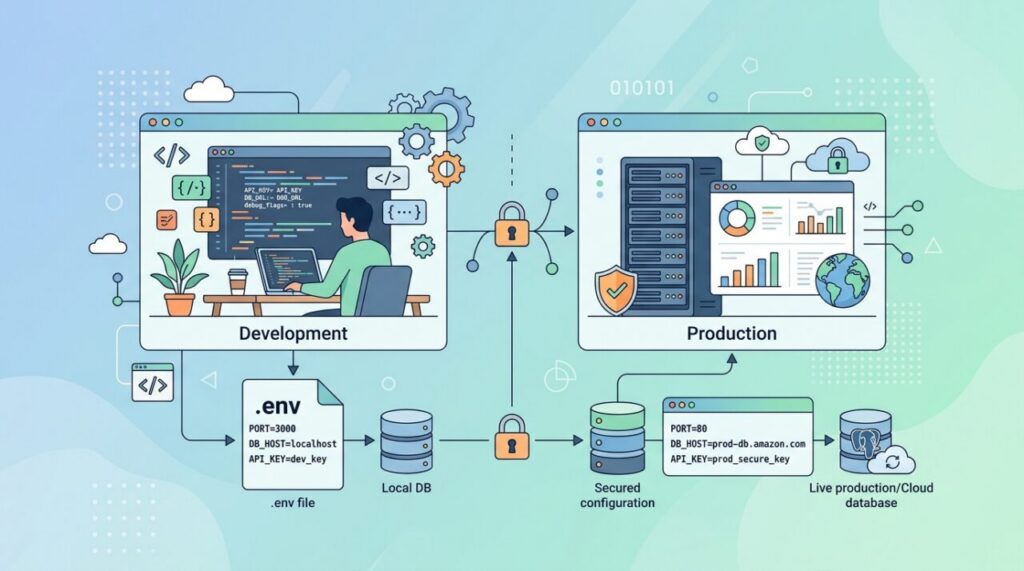

Somewhere in almost every real application is a set of values that shouldn’t be written directly into the code: database passwords, API keys, and settings that differ between your laptop and production. The standard, battle-tested way to handle all of them is environment variables. They’re simple, they’re everywhere, and using them well is one of those quiet skills that separates tidy codebases from fragile ones.
What environment variables are
An environment variable is a named value that lives outside your application, in the environment where the program runs. Your code reads it at runtime — for example process.env.DATABASE_URL in Node, or os.environ["DATABASE_URL"] in Python — rather than having the value hard-coded in a file. The operating system, your shell, or your hosting platform provides these values, and your app simply picks them up.
The core idea is separating configuration from code. Your code stays the same everywhere; only the environment around it changes. That single principle is why environment variables are a cornerstone of well-built modern software.
The two problems they solve
Environment variables exist to fix two very common headaches:
- Secrets management. Hard-coding a password or API key into your source is dangerous — the moment that code hits a repository, the secret is exposed to anyone with access. Environment variables keep secrets out of your codebase entirely.
- Environment-specific config. Your app needs a different database on your laptop than in production. Rather than editing code every time you deploy, you point the same code at different values in each environment.
If you’ve ever accidentally committed a secret, you know why this matters — and it pairs closely with the broader discipline of keeping secrets out of Git.
The .env file convention
During local development, typing out variables in your shell every time is tedious. The near-universal solution is a .env file — a simple text file of key-value pairs sitting in your project root:
DATABASE_URL=postgres://localhost:5432/myapp
API_KEY=sk_test_abc123
DEBUG=true
A small library (like dotenv) loads these into your app’s environment when it starts, so your code reads them exactly as if the system had set them. It’s convenient and keeps your local configuration in one obvious place.
The one rule you must never break
Here’s the mistake that bites people hardest: never commit your .env file to version control. It contains your real secrets. Add .env to your .gitignore immediately, before you ever create it. Committing it defeats the entire purpose and can leak credentials to anyone who sees the repo — including, if it’s public, the whole internet.
The standard practice is to commit a .env.example file instead: same keys, but with blank or dummy values. That documents which variables the app needs without exposing any real secrets, so a new teammate knows exactly what to fill in.
Best practices that keep you out of trouble
- Never hard-code secrets — if it’s sensitive or environment-specific, it belongs in an environment variable.
- Validate on startup — check that required variables exist when the app boots, so it fails loudly and immediately instead of mysteriously later.
- Use clear, uppercase names — the convention is
UPPER_SNAKE_CASE, which makes them instantly recognizable. - In production, use your platform’s secret manager — hosting providers and cloud platforms offer secure ways to set environment variables without a file on disk at all.
A subtle gotcha: everything is a string
One detail trips up newcomers: environment variables are always strings. When you set DEBUG=true, your code receives the text "true", not a boolean — and the string "false" is itself truthy in most languages. Likewise, a port number arrives as "3000", not the number 3000. Always convert and validate these values explicitly rather than assuming they arrive in the type you expect.
Setting environment variables on every platform
The concept is universal but the mechanics differ by environment, and knowing the common ones saves fumbling:
- Linux/macOS shell:
export API_KEY=abc123sets it for the session; prefixing a command (API_KEY=abc123 node app.js) sets it for just that process. - Windows:
set API_KEY=abc123in cmd, or$env:API_KEY="abc123"in PowerShell. - Docker: pass
-e API_KEY=abc123todocker run, or use theenvironment:andenv_file:keys in docker-compose.yml. - CI pipelines: GitHub Actions, GitLab CI, and friends all provide encrypted “secrets” settings that surface as environment variables during builds.
- Hosting platforms: Vercel, Netlify, Railway, Heroku and every cloud provider have a dashboard section for setting them per-environment — this is the right place for production values.
Notice the pattern: every layer of modern infrastructure speaks environment variables natively. That ubiquity is exactly why the convention won.
What to do if you’ve already leaked a secret
It happens to almost everyone once: you push a commit and spot an API key sitting in it. Here’s the part people get wrong — deleting the file and committing again does not fix it. The secret lives on in Git history, and automated bots scrape public repositories for exactly this, often within minutes of a push.
The correct response, in order: revoke the secret immediately (rotate the API key, change the password — this is the step that actually protects you), then clean the history with a tool like git filter-repo if the repo is shared, and finally add the file to .gitignore so it can’t recur. Treat any secret that ever touched a public commit as permanently compromised, no matter how fast you deleted it. Rotation, not deletion, is the cure.
When you’ve outgrown .env files
Environment variables are the right start, but at a certain scale teams graduate to dedicated secret managers — HashiCorp Vault, AWS Secrets Manager, Doppler, and similar. These add things flat env vars can’t offer: centralized rotation (change a database password once, every service picks it up), audit logs of who accessed what, fine-grained permissions per service, and automatic expiry. You don’t need this on day one — but if you’re juggling dozens of secrets across multiple services and teammates, the upgrade pays for itself the first time you have to rotate credentials in a hurry.
Frequently asked questions
Should I commit .env.example? Yes — that’s its purpose. It documents required variables with dummy values so new developers know what to configure. Just triple-check it contains placeholders, not copies of real values.
Are environment variables actually secure? They’re more secure than hard-coding, but not bulletproof: any code running in the process can read them, and they can leak through error reporters or debug pages that dump the environment. Configure your error tracker to scrub them, and never build a “debug” endpoint that prints the environment.
Why does my app see old values after I edit .env? Because the file is read once at startup. Restart the process — and in some frameworks, the dev server — for changes to load. This one bites everyone at least twice.
The takeaway
Environment variables are the standard way to separate configuration from code — keeping secrets out of your source and letting the same codebase run correctly in every environment. Use a .env file locally, never commit it, ship a .env.example for documentation, validate required values on startup, and remember that everything comes in as a string. Master this simple pattern and you’ll write applications that are safer, more portable, and far easier to deploy.